


In this guide I go through, step by step, how to connect a Honda outboard to an NMEA 2000 network and how to make sure your fishfinder displays the engine data correctly.
1. What do you need before you start?
Connecting a Honda outboard to NMEA 2000 is fairly easy as long as you use the right parts. You will need:
NMEA 2000 network parts
- Honda compatible engine cable
- NMEA 2000 backbone cable
- T-connectors (2 pcs, one for the engine cable, one for the fishfinder)
- Terminators (2 pcs: one at each end)
- Power cable (for the NMEA 2000 network)
- Fishfinder/display
We have put these parts together into two starter kits depending on the size of your boat:
For larger boats, choose the 4 metre kit
and for smaller boats the 2 metre kit.
If you already have a network, the Honda compatible 2 metre cable is available here and the 4 metre one here.
The kits contain the parts listed above, and you need nothing else to bring engine data from your Honda outboard. Check compatibility! Compatible engines are listed at the bottom of this article.
2. Building the NMEA 2000 network
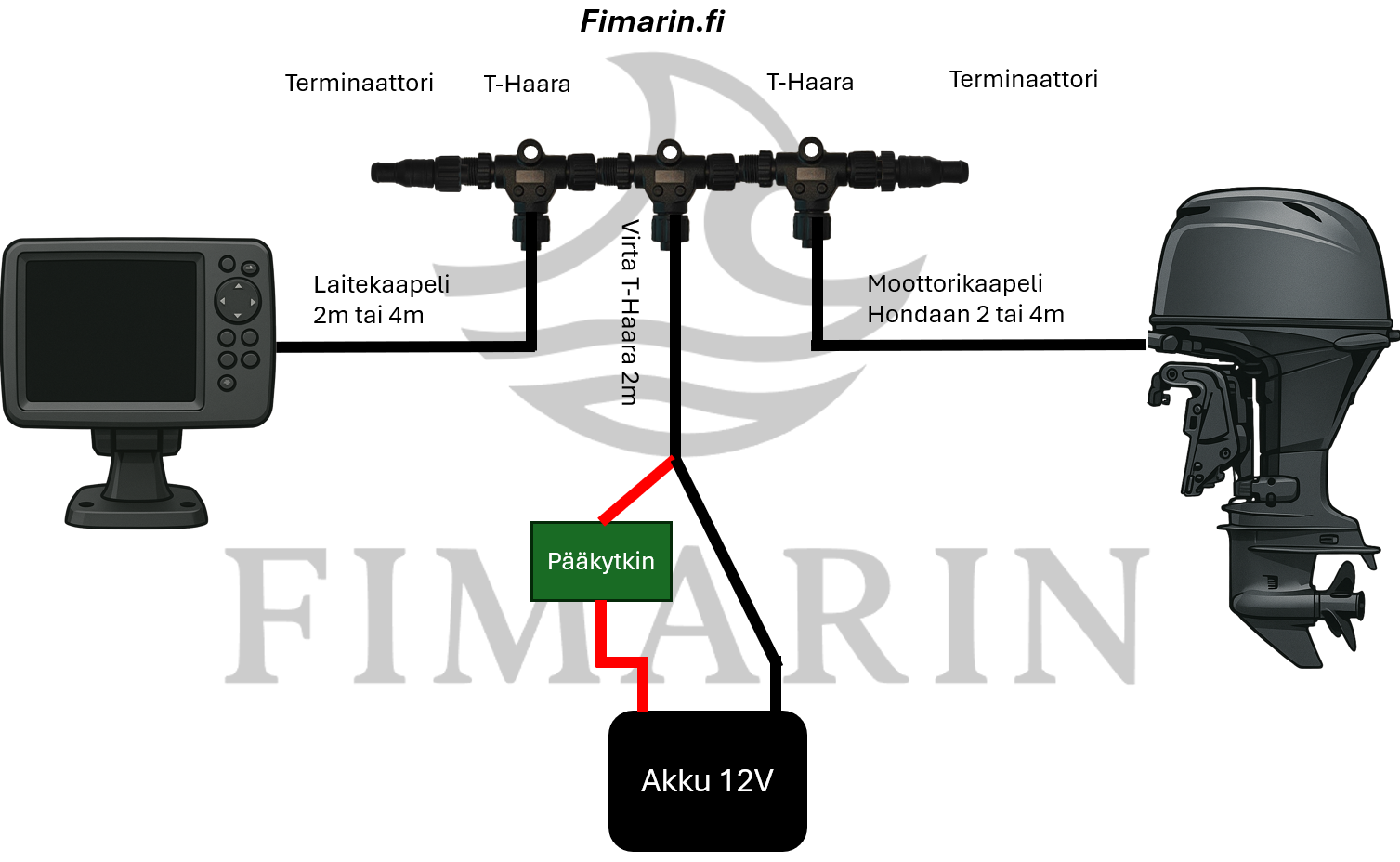
Build the NMEA 2000 network according to the diagram:
- Connect the power tap to the battery via the main switch. Make sure the main switch is in the off position.
- Connect the T-connectors on both sides of the power cable.
- Connect the cable coming from the engine to one T-connector and the cable going to the fishfinder to the other.
- Attach the terminators to both ends of the T-connector row.
Notes on the power tap:
Run the cable to the 12V battery and make sure that the positive wire between the battery and the NMEA 2000 system goes through the main switch. If the NMEA 2000 system is incorrectly connected directly to the battery, it can draw power even when the devices are in standby. The main switch prevents flat battery problems. The power cable must include a fuse to protect the devices and the system. The Fimarin power tap and power cable come with a 5A fuse already fitted to protect the system.
3. Connecting a Honda outboard to the NMEA 2000 network:
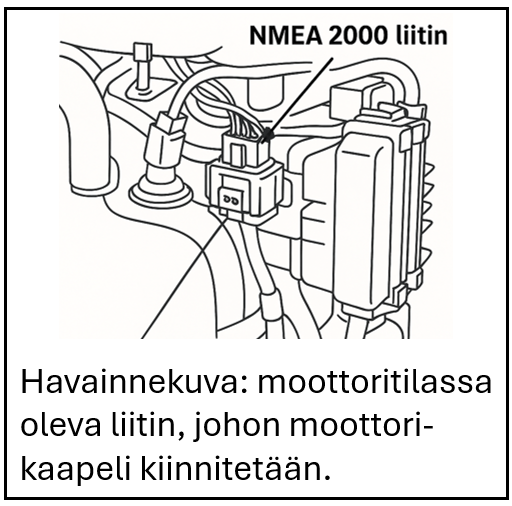
1. Open the engine cowling and locate the NMEA connector in the engine compartment. Check the connector location in your engine's owner's manual (BF40/50D p. 22, DBF60A p. 17, BF80/100A p. 19, BF80/100Ak1 p. 18, BF115D p. 15)
2. Route the cable from the engine through the same grommet as the control cables.
4. Switch on the chartplotter/fishfinder.
5. Switch on the engine ignition.
6. Check the NMEA 2000 settings in your chartplotter/fishfinder. The menu path is slightly different for each fishfinder brand, so refer to your display's own manual if needed.
7. Check in the settings that the bus is working. Add engine data to the views you want.
Compatibility of the Fimarin Honda compatible NMEA 2000 cable with Honda outboards:
BF40D – from serial number BBDJ-1000001
BF50D – from serial number BBEJ-1000001
BF60A – from serial number BBFJ-1000050
BFP60A – from serial number BBFJ-8000007
BF75DK3 – from serial number BBAJ-1200001
BF90DK4 – from serial number BBCJ-1300001
BF100A – from serial number BBMS-1000001
BF115D – from serial number BBHJ-1000001
BF135A – from serial number BARJ-1301771
BF150A – from serial number BANJ-1304171
BF200AK1 – from serial number BAEJ-1600002
BF225AK1 – from serial number BAGJ-1600012
BF250A – from serial number BBJJ-1000001
BF200D – 250D – all
BF350A – all
Leave a Reply