


Do you have Yamaha gauges and a Yamaha Command Link Hub, but would also like to see engine data on your fishfinder?
If you have a Yamaha Command Link (not Command Link Plus!) compatible Yamaha outboard and gauges installed via a Command Link Hub, these instructions let you build a cost-effective connection between the engine and the chartplotter. The installation requires one free port on the hub.
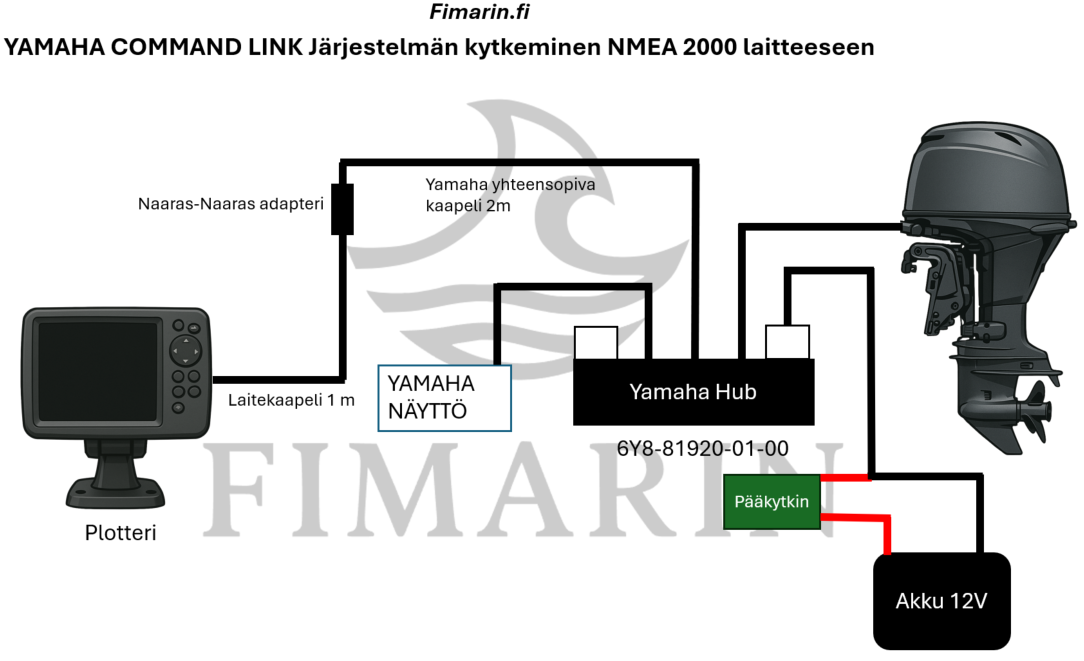
This installation method lets you bring engine data to the chartplotter without a separate NMEA 2000 backbone. It works by extending Yamaha's own network directly from a free port on the Yamaha hub with a ”Yamaha engine cable” and connecting the chartplotter to the same bus with a Micro-C connector. A female-female adapter and a short NMEA 2000 cable are also needed after the engine cable. This is a cost-effective and reliable way to connect Yamaha engine data to modern chartplotters, and it is based on the NMEA 2000 compatibility of Yamaha's Command Link network.
Installation principle
Yamaha Command Link uses the same bus technology as NMEA 2000, and therefore:
The bus can be extended at the Yamaha terminator using the Yamaha engine cable. The cable acts as an adapter cable between Command Link and the NMEA 2000 network. An NMEA drop can be brought to the chartplotter without a separate NMEA 2000 backbone.
Required parts:
- Yamaha Command Link compatible cable (2 m)
(can also be used as a Yamaha engine cable) - Female–female adapter
- Drop cable (1 m)
Everything you need is conveniently gathered into one kit:
https://www.fimarin.fi/yamaha-command-link-kytkentapaketti
Installation steps
Step 0 — Switch off power to the Yamaha hub. The easiest way is to disconnect the power supply cable connector from the hub.
1 — Remove the white cap from the free port on the Yamaha hub.
2 — Install the Yamaha NMEA 2000 engine cable in the free port.
3 — Add the NMEA 2000 adapter to the end of the engine cable.
4 — Add the NMEA 2000 backbone/drop cable to the adapter.
5 — Connect the other end of the backbone/drop cable to the chartplotter's Micro-C NMEA 2000 port.
6 — Switch the power back on.
7 — Switch on the engine and the chartplotter. The engine should now appear in the chartplotter's NMEA 2000 settings.
Leave a Reply